
Requirements
Closed testing countries/regions: why testers see 'not available in your country' and how to fix it
A closed testing track has its own countries/regions list, separate from your production release. Testers outside that list can't find or install your app — including the devices of a testing service. Where to change it in Play Console, how long it takes, and why removing a country later is safe.
Last checked 31. okt 2026.
Closed testing tracks have their own country list
You set up your closed test, add 12 testers, send them the opt-in link — and one of them reports that Google Play says the app isn’t available in their country, or simply can’t find it. Most of the time the cause is the track’s Countries / regions list.
In Play Console, every testing track has its own countries/regions setting, separate from your production release (Play Console Help). A tester who is on your tester list but lives in a country that isn’t on the track can’t install the app. This catches many developers who only plan to launch in their own country and pick just that one country for every track.
What it looks like for testers
- The opt-in link works and says they’re a tester, but the Play Store page says the app isn’t available in your country.
- Searching for the app or opening its Play Store link shows nothing for them, while it works for you.
- Some testers can install and others can’t, and the ones who can’t all live in the same country (or use a Play Store account registered in another country).
How to add a country to your closed testing track
- In Play Console, go to Test and release → Testing → Closed testing and click Manage track on the track your testers use.
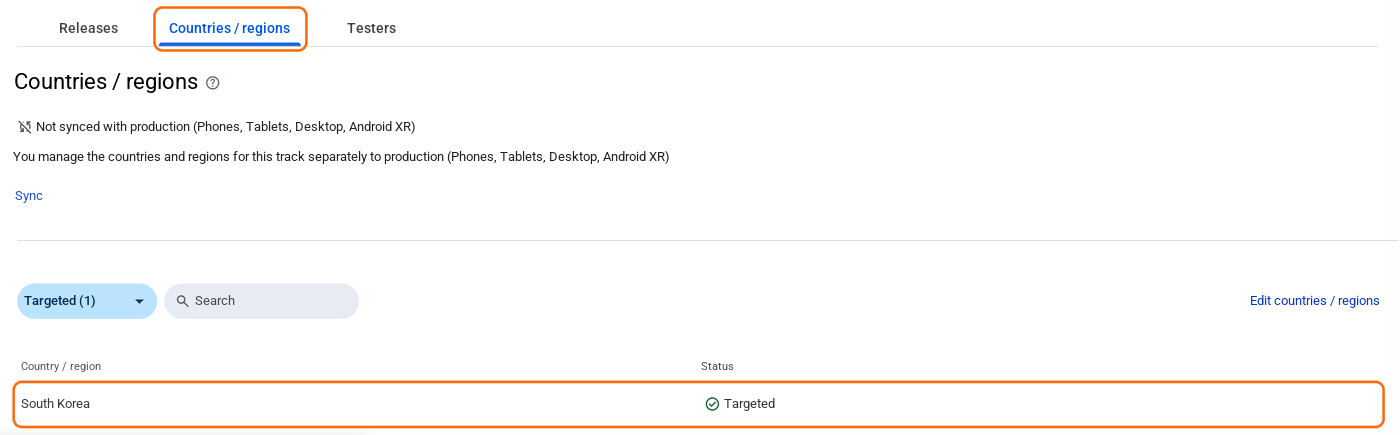
- Open the Countries / regions tab and click Edit countries / regions.
- Check the countries where your testers are, then save.
- Go to Publishing overview. If managed publishing is on, send the change for review and publish it when it’s approved; otherwise it’s sent for review automatically.
- Once the change is live, ask the testers to open the Play Store link again.
Country changes go through review like other track changes, so give it some time. If the track still shows In review, see Closed testing stuck in review.
If the country is already on the list
- Wrong account on the device. The tester has to be signed in to the Play Store with the exact email (or Google Group member) you added. With several accounts on one phone, the Play Store may use a different one.
- Not opted in yet. Being on the list isn’t enough; each tester has to accept through the opt-in link. Details in How to add testers.
- Device compatibility. If the device doesn’t meet your app’s minimum Android version or required features, the Play Store says the app isn’t compatible — a different message from the country one.
- Paid app. Testers of a paid app still have to buy it. Many developers make the app free during the closed test.
Can you remove the country later?
Yes. The closed testing countries don’t limit your production release, so you can launch in only the countries you want. Just don’t remove a country while testers there are still needed for your 14 days: the moment they lose access, they stop counting toward your 12, and their 14 days start over if they come back. Wait until production access is approved.
If you use DUIRE
DUIRE runs your closed test on real Android devices in South Korea, so South Korea has to be on your closed testing track. Add it to the closed testing track only — not to production. Before you pay, our devices check whether they can install your app from the Play Store, and if South Korea is missing the check shows Country restricted with how to fix it. You don’t pay until enough devices can install it.
The full setup — creating the track, adding testers, and choosing countries — is in Google Play closed testing requirements.
Frequently asked questions
- Does the closed testing track use the same countries as my production release?
- No. Each testing track has its own countries/regions list. A country you add for closed testing doesn't make your app available there in production, and your production countries don't carry over to the closed test.
- A tester says the app 'isn't available in your country'. What should I check first?
- Check that their country is on the closed testing track's Countries / regions tab, that they're signed in to the Play Store with the email you added as a tester, and that the release (and any tester or country change) has finished Google's review in Publishing overview.
- Do I need to send a new release after adding a country?
- No. Changing countries/regions doesn't need a new app bundle, but the change goes through review like other track changes. Testers in the new country can install the app once the change is published.
- Will removing a country later break my 14-day closed test?
- If testers in that country are still part of your 12, yes — they can no longer access the app, so keep the country until you've applied for production access and been approved. After approval, removing it from the closed testing track doesn't affect your production release.
- Why does DUIRE need South Korea on my track?
- DUIRE's tester devices are in South Korea. If South Korea isn't on your closed testing track, the Play Store hides your app from them and our free installability check shows "Country restricted". Add it only to the closed testing track; your production countries can stay as they are.
Meet the requirement without recruiting testers
DUIRE joins your closed test with real Android devices and opens your app every day for 14 days. Registering your app and checking installability are free.