
Requirements
Closed testing stuck 'In review'? How long it takes and what to check
Closed testing releases and tester lists have to pass Google's review before they reach testers. Until review is done, the opt-in link doesn't appear and the 14 days don't start. We cover what to check first, such as whether you actually sent it for review and whether managed publishing is on, and what to do while you wait.
Last checked Oct 14, 2026.
1. What's being reviewed
Changes such as a release on your closed testing track and your tester list reach testers only after Google reviews them. For an app you're uploading for the first time, the review also covers the app itself, your store listing, and what you entered under app content.
Until the review is done and your app is Published, the opt-in link doesn't appear on the Testers tab and testers can't join. That means the 14 days also start only after the review is done. Build this waiting time into your launch schedule.
2. How long it takes
Google doesn't set a review time. Some reviews finish in a few hours, but first uploads and newly created accounts can take several days, sometimes more than a week. Updates to an app that has already been published, or changes to the tester list, tend to go faster.
If nothing has moved in days, check the items below before you keep waiting. Quite often the changes aren't actually in review — they were never sent.
3. What to check first
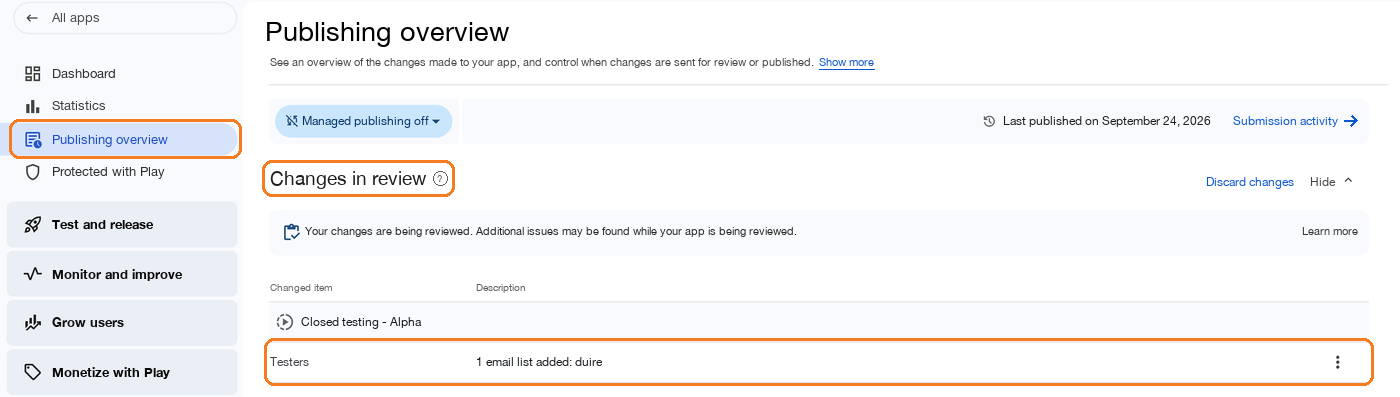
- Did you actually send it for review? Changes you save on a track don't go to review right away; they pile up in Publishing overview. Google's documentation says changes are added to the ‘Changes ready to send for review’ section of Publishing overview, and you decide when to send them. If they're still sitting there, the review hasn't started.
- Is managed publishing turned on? The managed publishing status is shown at the top of Publishing overview. If it's on, approved changes aren't published automatically — you have to publish them yourself before testers see them.
- Have you finished setting up your app? You can only use closed testing once your app is set up. Check that nothing is missing in the app content items on your dashboard (privacy policy, app access, content ratings, target audience, data safety, and so on).
- If your app requires sign-in, did you provide login details for review? If reviewers can't get into your app, the review can be delayed or rejected.
You can read how to send changes for review and publish them in Play Console Help: Prepare and roll out a release.
4. If your app is rejected
If the review finds a policy issue, you'll get the reason by email to your account and in Play Console. Fix what the reason points to and send a new release or the corrected declaration for review again. Testers haven't joined yet, so you lose nothing from your 14 days.
5. What to do while you wait
- Gather all your testers. If all 12 testers join on the day the review finishes, your 14 days are as short as they can be. Recruit a few extra too (ways to find testers compared).
- Prepare your tester instructions. Write down the opt-in link, which Google account to sign in with, a request not to uninstall for 14 days, and the features you want them to try.
- Check your build with internal testing. Internal testing may not be subject to review, so it rolls out quickly. However, internal testers can't join closed testing for the same app, so keep separate accounts for your closed testers (internal vs. closed vs. open testing).
For the steps after the review, see the Play Console setup steps in our closed testing requirements guide; for how the 14 days are counted, see When do the 14 days start?.
Frequently asked questions
- Do the 14 days count while my app is in review?
- No. Testers can only see the opt-in link and join once the review is done and your app is published. The 14 days are counted from when testers opt in, so time spent in review doesn't count toward the 14 days.
- How long does a closed testing review usually take?
- Google doesn't commit to a fixed time. Some reviews finish in a few hours; for a first upload or a new account, it can take several days and sometimes more than a week.
- I only changed the tester list, and now it's in review again.
- Changing the tester list is also a change that goes through review. If a tester item shows up under the changes in review in Publishing overview, that's normal.
- Can I add testers while the app is in review?
- Yes. But every edit to the list creates another change, so it's cleaner to gather all your testers first, add them in one go, and send them for review together with your release.
- Can I share the opt-in link while the app is in review?
- According to Google's documentation, the opt-in link is only shown when your app's status is "Published" — not while it's "Draft" or "Pending publication." You need to send it after the review is finished.
Meet the requirement without recruiting testers
DUIRE joins your closed test with real Android devices and opens your app every day for 14 days. Registering your app and checking installability are free.